Showing posts with label vocabulary. Show all posts

Tuesday, February 18, 2014

'Word Clouds' on steroids

Learning lots and lots of new vocabulary can be overwhelming for language learners. Vocabulary is an important part of language learning, however, memorising long lists of new words is not always the best way to go. Most learners have better recall of information they have used, explored and made connections with. When students are excited and involved with their learning they are able take on and retain more new information.

Word clouds have been around for a while and can be quite engaging for students. Many language teachers successfully use ‘word clouds’ to introduce, reinforce and review vocabulary. Some of the most popular tools are Wordle, Tagxedo, Wordsift and Tagul. My personal favourite is Tagul and I will explain why later in this post.

The embedded slideshare presentation by David Dodgson contains succinct information about using word clouds in the language learning classroom

What is a word Cloud?


I am a believer in the addage a picture's worth a thousand words. Hence, rather than describing the tools for you, I have created and embedded some word clouds so that you can be the judge!


 And last but not least

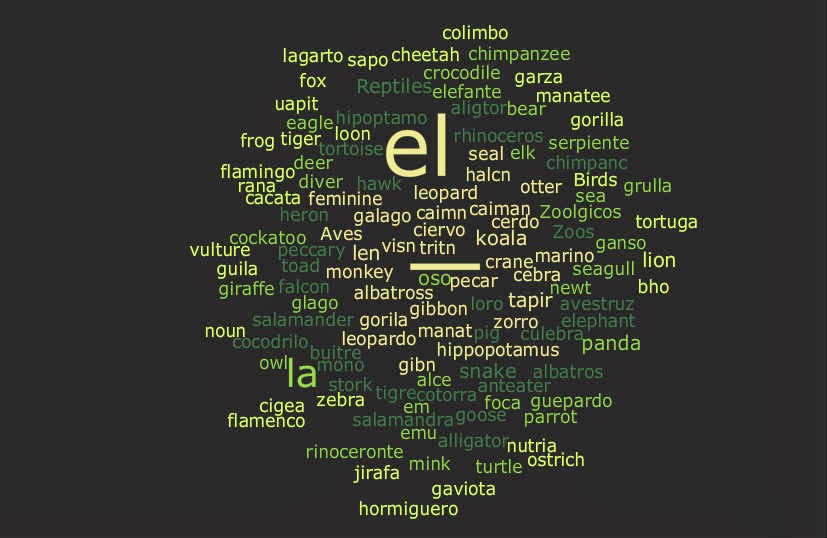
Tagul is an amazing word cloud creator which allows you to customise the shape of your tag clouds and insert active hyperlinks. When you create a word cloud with Tagul all the words are automatically linked to a Google search however you are able to add your own link to any word and link to any pages or content on the web. Tagul will create word clouds from entered text or any url you specify.

I created the tagul above using the names of animals in Spanish. I played with customising the hyperlinks. Most of the words are linked to a wikimedia search but it is also possible to enter specific links for individual words. In the embedded example the links to some words are customised to lead to specific websites. Check out el leon, el antelope, el oso, el gato and la mariposa, to see how the links work. Shell Terrel has written a great post in her blog Teacher Reboot Camp about using tag clouds to reinforce vocabulary. Her post gives detailed instructions on how to customise the hyperklinks of tags in Tagul.

When you have finished designing your word cloud Tagul provides you with an embed code to put your cloud on your blog.
To get started you may like to use the step by step instructions by Modern Educator in the video below


Monday, February 13, 2012

Tagxedo: Create word shapes

A little like Wordle (see earlier post), Tagxedo enables you to create beautiful displays of text. The advantages of Tagxedo include:
1. You can chose a shape for your text.
2. There is more interactivity when online (words 'pop out' when you scroll over them, and link to a Google search - try it below).
3. It accepts and recognises script.


For both Tagxedo and Wordle:
1. You can enter phrases (e.g. watching~tv) by joining words with a tilde (top left on your keyboard).
2. The more times you enter a word/phrase, the larger it appears in the final images (acting as a 'heading').

Sample activities for both:
- vocabulary posters for each chapter/topic/function (e.g. verb charts, preposition charts). Text can be copied from the internet or existing documents.
- pre-testing - ask students what they know at the start of a unit of work, and then again at the end of the unit. Create a poster each time, and then compare - this is an excellent way for students to visualise their progress.
- summaries of an article, chapter, film scene, poem or book (good for Extension/Heritage/Background Speakers courses).
- self-descriptions (students could enter a list of words to describe themselves) - see 'Alice' example below.

Thursday, September 22, 2011

Quizlet: A simply FANTASTIC online flashcard generator

Quizlet is an online flashcard maker and vocabulary learner. You can create your own flashcards, or students can create their own sets of vocabulary (by chapter, by topic, etc.) and then learn the vocabulary through a series of steps and games. Without exaggeration, to create a set of 15-20 vocabulary items, you'll need less than five minutes!! You can also access existing games created by other teachers and students (Caution: there may be errors!). All languages available.

Wordle

Wordle enables teachers and students "to create beautiful word clouds" - a great brainstorming or summarising tool. At the end of each topic, students can create their own vocab list – in a much more visually spectacular fashion! Each ‘wordle’ (see image below) can be printed off in colour, and laminated for students to display in the classroom or at home.
Note: Students cannot type in script, however ALT codes can be used for European characters.